Your Pine scripts.
A clearer view.
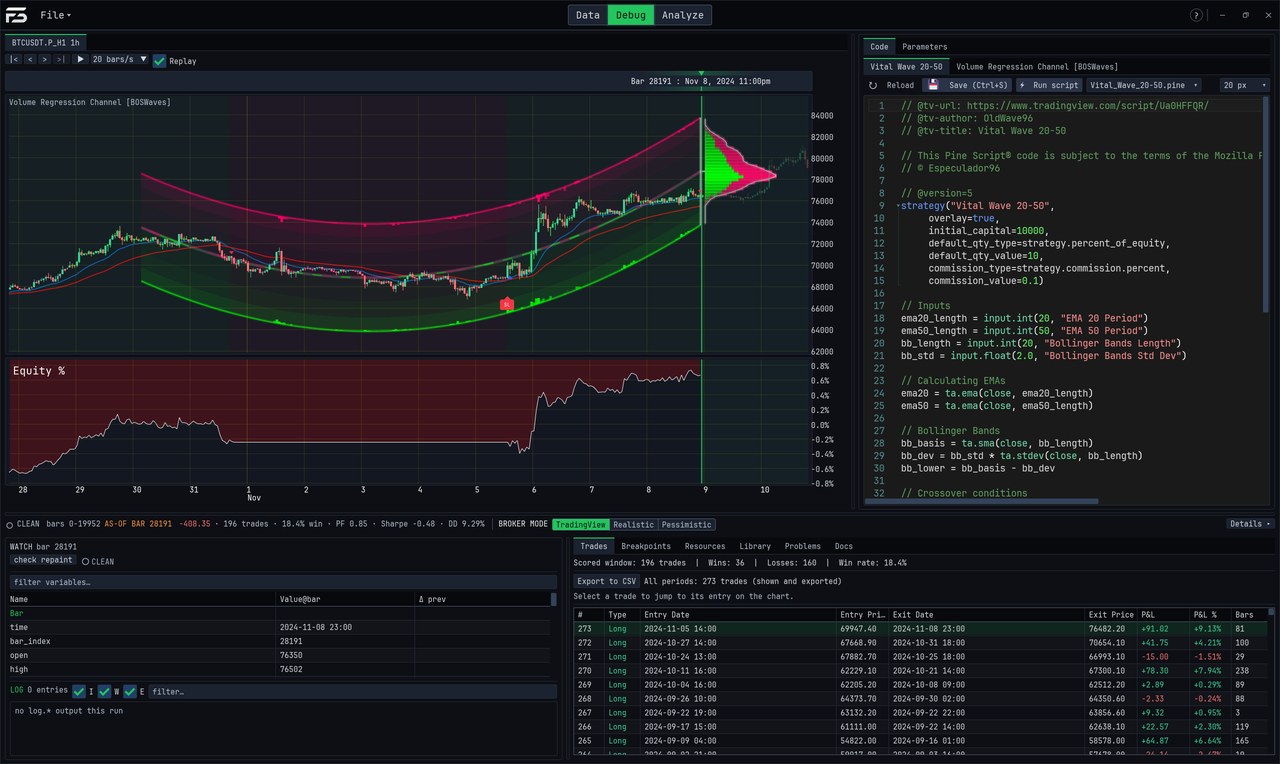
Test your TradingView .pine strategies in your browser — nothing to install. Your script is compiled and run on your own machine, fast enough to drag a parameter and watch the results update. Develop, inspect and test, then carry your code and settings back to TradingView.
Run a Pine strategy locally · drag an input and watch the whole backtest re-run · see mistakes as you type · read every variable on any bar · replay history · tune it and see the out-of-sample result beside the in-sample one · walk-forward test it · catch a script that repaints · or let an AI agent drive it. In this example the tuned strategy looks good on the data it was tuned on and still loses on data it never saw — Foresight shows both. Served from this site: no third-party video service, and nothing downloads until you press play. Also on YouTube. Strategy shown: Vital Wave 20-50 © Especulador96 (OldWave96), unmodified, under the Mozilla Public License 2.0. Not affiliated with or endorsed by its author or TradingView. Music: “Background Music” by Sub_Clair (Pixabay). A backtest is not a prediction.
A Pine indicator replayed through history — the script is re-run as of each bar, seeing only the data it had then — and re-run live as its inputs are dragged. Indicator shown: Volume Regression Channel © BOSWaves, unmodified, under the Mozilla Public License 2.0. Not affiliated with or endorsed by BOSWaves or TradingView.
A strategy that backtests at an 83% win rate — because one line reads a higher-timeframe close before that bar has finished. Foresight runs every strategy twice, once as written and once seeing only data that existed at the time, and flags the difference; in Replay you can watch the line move to a price the candles only reach hours later. The repainting example was written for this video; the clean example is Vital Wave 20-50 © Especulador96 (OldWave96), unmodified, MPL 2.0. A clean verdict means no repainting was found on this data — it is not a judgement of the strategy.
Measured accuracy.
Visible limits.
Compare results with evidence, not a blanket promise. The suite below scores Foresight's trades against trade lists exported from TradingView: trade count for every scored backtest, entry timing and direction where they can be compared. It does not establish identical trades or results for every script. Baseline: 2026-10-06.
Your .pine script is compiled, not interpreted.
Foresight doesn't walk your script line by line. It compiles your strategy — to WebAssembly in the browser, to native machine code in the desktop app — and runs it on your own CPU, which is where the instant, drag-to-tune re-runs come from. Speed isn't a luxury feature: when a full backtest costs milliseconds, you can afford to leave the rigorous stuff — walk-forward, robustness checks, honest fills — switched on.
A backtester that tries to talk you out of bad edges.
Most backtesters are built to flatter you — optimistic fills, one lucky chart, a number that goes up. Foresight is built the other way: its job is to kill fragile edges before your money does. Everything below exists to answer one question: would this survive contact with a real broker?
Drive it with an agent — or from Python.
The desktop app exposes its engine over MCP (Model Context Protocol) and a matching Python client — one shared command core. Point Claude (or any MCP client) at it and the agent can run backtests, sweep parameters, run the optimizer, read equity curves and trades, and edit your script directly. Prefer code? The source-only Python client drives the same engine — OHLCV and result series move as numpy arrays, against the live GUI or fully headless. It is not bundled with the installer or published on PyPI yet. The web app can be driven by an AI client too: the client connects through foresight.trading and works in a Foresight tab you have open. That connection is newer than the desktop server, and some tools are desktop-only.
tv, strict, adversarial).Audited against 29,459 real published Pine scripts.
The compile audit ran all 29,459 community-published Pine scripts on one build (2026-10-07). 28,050 compile and run. 1,326 are set aside: 970 need data Foresight does not have, 266 import a library version that is no longer available, and 90 are rejected or stopped by TradingView itself. Of the 28,133 that remain, 99.7% compile and run; 83 do not yet. Where a script asks for data the audit lacks, the data was simulated: this shows the script runs, not that its values match TradingView. Our curated regression corpus (6,213 strategies & indicators, incl. LuxAlgo) records 98.1% passing as of 2026-09-18. Trade accuracy is measured separately: 2,478 scripts (2,822 backtests) are scored against TradingView's own trade lists. Every one matches its trade count within tolerance, and 96.2% also match on entry timing and direction (baseline 2026-10-06). 42% of the 4,886 backtests attempted are excluded from scoring for declared reasons (missing golden exports, paid data entitlements) — we publish that rather than bury it. Hit a script that doesn't work? Send it — fixing those is the whole game.
var / varip persistence, series history []● SUPPORTEDta.*)● SUPPORTEDrequest.security — incl. ta.* & computed expressions● SUPPORTEDrequest.security (other tickers, e.g. VIX) — needs that symbol's data loaded● SUPPORTEDrequest.security_lower_tf) — minute floor; matching finer data must be loaded, or fetchable (in the web app, from crypto exchanges only)● SUPPORTEDimport Author/Lib/N) — vendored or local libraries● SUPPORTEDrequest.financial / economic data○ NOT YETFree while we're in beta.
Foresight is free to use during the public beta — the web app and the Windows desktop app, on one account. Pricing after the beta has not been announced. Desktop beta builds expire after 30 days so testers move onto current fixes and compatibility updates; the web app is always the current version.
- › The web app and the Windows desktop app
- › Backtesting, debugger, optimizer, walk-forward
- › Local MCP server for agent workflows (desktop)
- › A direct line to shape what gets built
PRICING AT LAUNCH — TO BE ANNOUNCED
Bring your own strategy.
One free beta account opens both. Start in the browser — there is nothing to install — and add the Windows app when you want the parts the browser doesn't have yet.